Comparison · Updated
The best dream journal apps in 2026
I've written down my dreams almost every morning for years, and I've tried every dream journal app worth trying. The best one is Lucidity: free and unlimited, private by default, and built to help you remember more dreams.
Our picks
 Best overall Lucidity Free and unlimited, private, with interpretation and lucid dreaming
 Best for sharing dreams Elsewhere Community feed and AI dream art
 Best pay-once journal on iPhone Dreams $13.99 once, no interpretation
 Smallest budget Dream Journal Ultimate $2.99 once
What makes a great dream journal
A dream fades within minutes of waking. A good journal app gets out of your way in that window, and then helps you see what your dreams have in common.
After years of doing this every day, these are the four things I look for in a dream journal app:
- Fast capture, by text or voice, in a dark interface that won't wake you up fully.
- Structure, so you can tag who and what appears, and find patterns later. Those patterns are your dream signs.
- Privacy. Dreams are about as personal as writing gets.
- Your data is yours: export, and an app that's still updated.
Comparison table
| Feature | Lucidity |  Oniri | Elsewhere | Dream Journal Ultimate |
|---|---|---|---|---|
| Basics | ||||
| iPhone | ✓ | ✓ | ✓ | ✓ |
| Android | ✓ | ✓ | ✓ | ✓ |
| Price | from $48/yr | $59.99/yr | $49.99/yr | $2.99 once |
| Free dream journal | ✓ Unlimited | ✓ | ✓ | ✓ |
| Still updated | ✓ | ✓ | ✓ | ✓ |
| Learn to lucid dream | ||||
| Step-by-step programLessons in a set order | ✓ 7 interactive modules | Lessons | ✕ | Written lessons |
| Guided MILD, WILD, SSILDPractice screens with timers | ✓ | ✓ | ✕ | ✕ |
| Guided wake back to bedAlarm and routine in the app | ✓ Full routine | Set alarm yourself | ✕ | ✕ |
| Reality-check reminders | ✓ Custom | ✓ | ✕ | ✓ |
| Night audio | ✕ | ✓ | ✕ | ✕ |
| Dream journal | ||||
| Voice to text | ✓ | ✓ | ✕ | Unreliable |
| People, places, emotions | ✓ Also automatic | ✓ | ✓ Automatic | Tags only |
| Export your dreams | ✓ | ✓ | ✓ | Paid |
| Import from other apps | ✓ | ✓ | ✕ | ✕ |
| Privacy | ||||
| Dreams stay on your phone | ✓ | ✕ Account | ✕ Account | ✕ Account |
| No public feed | ✓ | ✓ | ✕ Community | ✕ Dream wall |
| PIN or Face ID lock | ✓ | ✓ | ✓ | Unreliable |
| Dream interpretation | ||||
| AI dream interpretation | ✓ Unlimited | ✓ | Metered | ✓ |
| Personal dream dictionaryBuilt from your own dreams | ✓ From your dreams | Statistics | Symbol insights | Generic |
| Emotion map | ✓ Emotion wheel | ✓ | ✕ | ✕ |
From the App Store and Google Play listings, November 2026.
The 7 best dream journal apps, ranked
Lucidity
Best overall · Best for a private, complete dream journal
- Price
- Free, Pro from $48/yr
- Platforms
- iPhone, Android
- Rating
- 4.8 on Google Play
- Last update
- October 2026
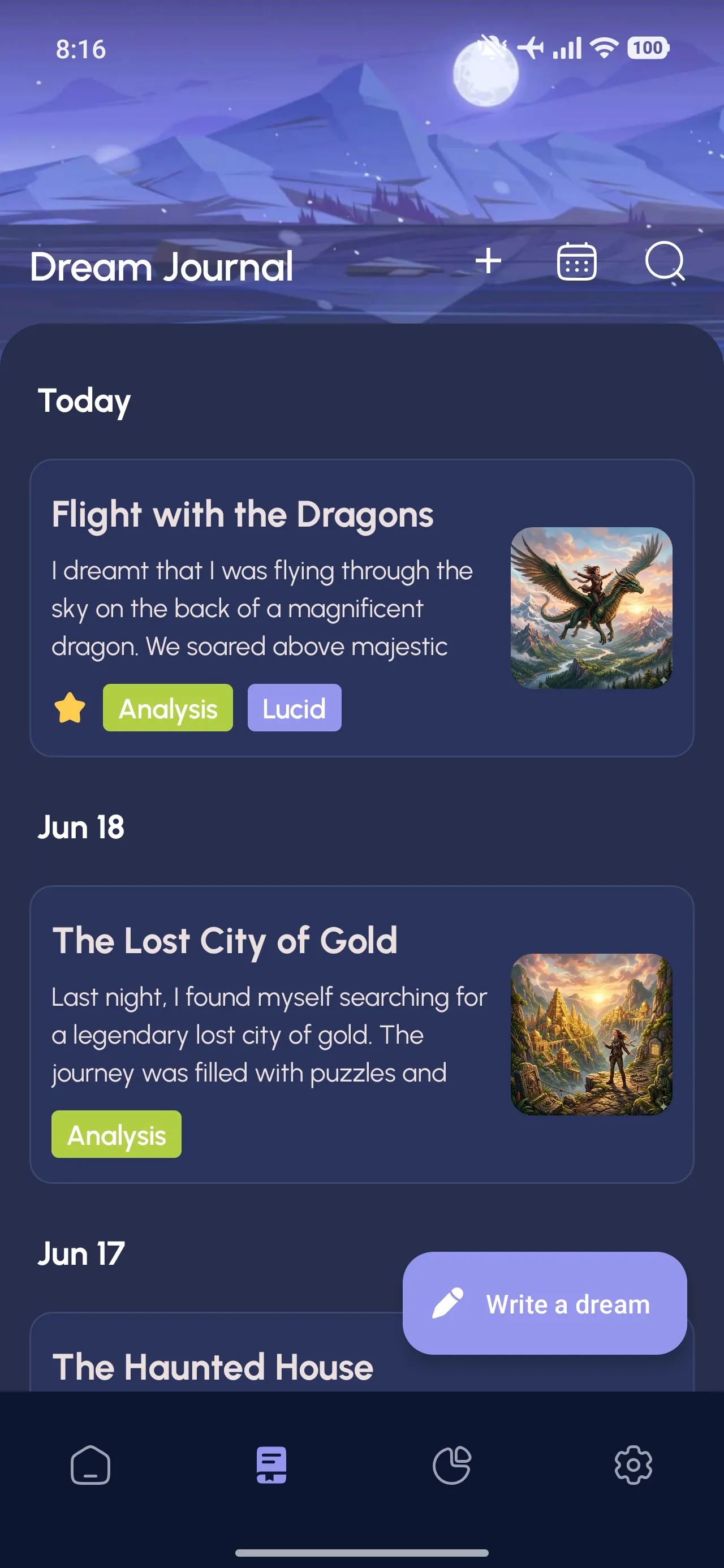
Lucidity's journal is free and unlimited. Type your dream, or speak it and get the text. Tag the people, places, emotions and symbols, or let the app pick them up for you.
The calendar and statistics show what keeps coming back. That's how you spot your recurring dreams, and how lucid dreamers find their dream signs.
Your journal stays on your phone by default. No account, and it works offline. You can lock it with a PIN or Face ID, and export it whenever you want. Cloud sync is there when you choose to turn it on.
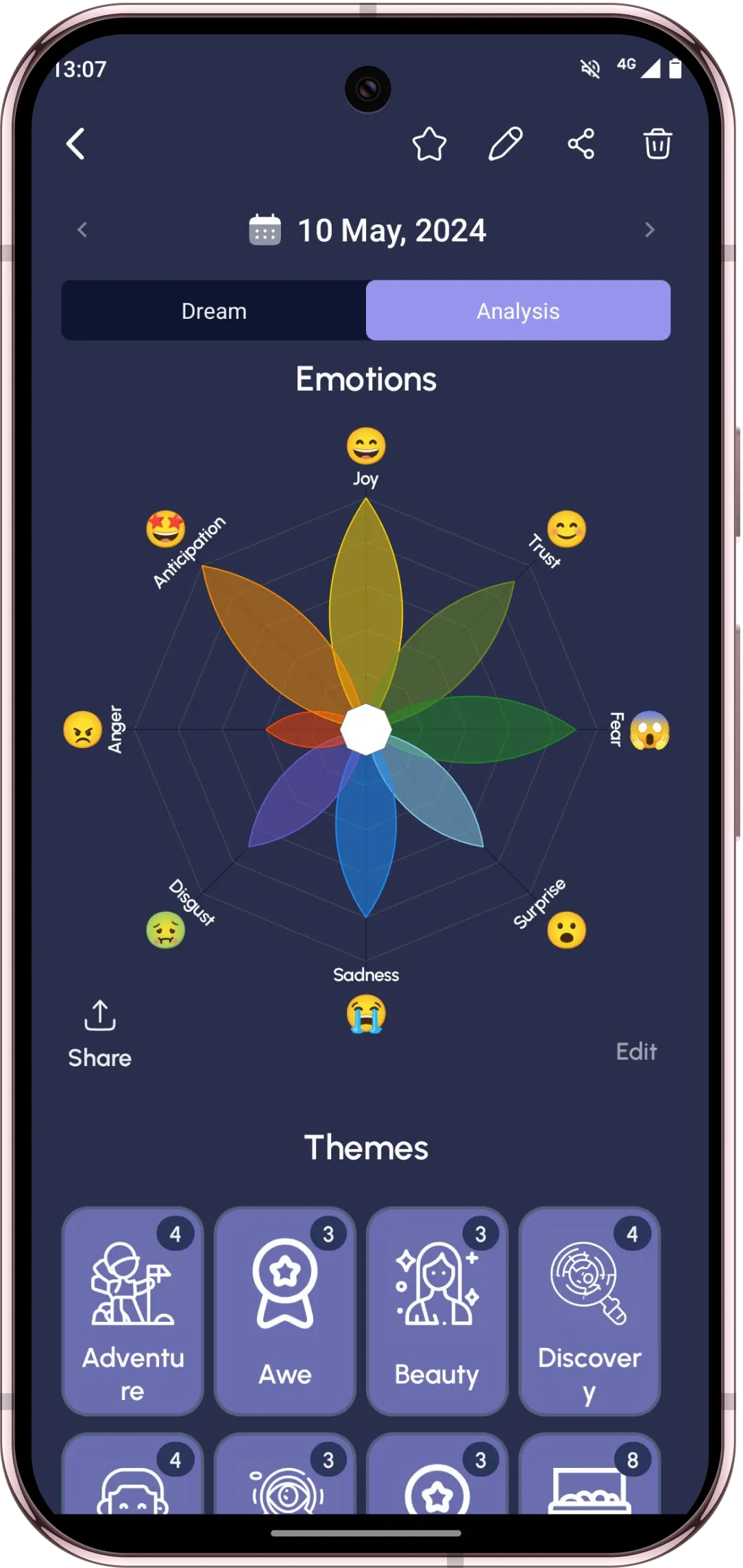
When you want to understand a dream, Lucidity gives you a personal, psychology-based reading and maps its emotions on Plutchik's emotion wheel.
And if your dreams make you curious about lucid dreaming, the program is right there, starting with your recall.
It's kind of creepy how accurate the dream analysis is. The AI finds themes and patterns in dreams we thought may be meaningless nonsense.
Google Play review
Amazing app, the dream analysis is extremely impressive.
Google Play review
Pros
- Free and unlimited, no ads, no account
- Dreams stay on your phone by default
- Voice to text, images and drawings
- Tags detected automatically with Pro
- AI interpretation and a lucid dreaming program built in
Cons
- No home-screen widgets yet
- No Apple Health connection
Oniri
Best for a detailed journal with widgets
- Price
- Free, Premium $59.99/yr
- Platforms
- iPhone, Android
- Rating
- 3.7 on Google Play
- Last update
- October 2026
Oniri has a detailed journal where you tag the details of each dream by hand, with widgets to capture a dream from your home screen. Your journal lives in your Oniri account. Interpretation and voice notes need Premium.
Pros
- Detailed tagging
- Export and import
- Home-screen widgets
Cons
- Journal stored in your Oniri account
- Voice notes and statistics are Premium
- $59.99 a year
Elsewhere
Best for sharing dreams with others
- Price
- Free, $49.99/yr
- Platforms
- iPhone, Android, web
- Rating
- 4.3 on Google Play
- Last update
- October 2026
Elsewhere is beautiful and social. You write a dream and it gets tagged and illustrated automatically, and you can share it with a community. If you want your dreams kept to yourself, the social side gets in the way.
Pros
- Automatic tagging and AI dream art
- Community and dream sharing
- Scans paper journal pages
Cons
- No voice capture
- AI readings are metered, even on paid plans
- Account-based, with a public community layer
Dreams
Best for a plain iPhone journal
- Price
- $13.99 once
- Platforms
- iPhone only
- Rating
- 4.7 on the App Store
- Last update
- September 2026
Dreams is a simple pay-once journal for iPhone. It records your dreams and your sleep, and stops there. A fair choice if you want a plain journal and nothing else.
Pros
- Pay once, $13.99
- Keeps data on your iPhone and iCloud
- Drawing canvas
Cons
- iPhone only
- No interpretation
- Free version capped
Dream Journal Ultimate
Best for the smallest budget
- Price
- $2.99 once
- Platforms
- iPhone, Android
- Rating
- 4.2 on Google Play
- Last update
- October 2026
Dream Journal Ultimate is the cheapest paid journal. It's plain and does the basics, with a public dream wall you have to keep an eye on.
Pros
- $2.99 once
- Notes, tags and moon phase
Cons
- Voice and PIN lock reported unreliable
- Export needs the paid version
- Public dream wall toggle on every entry

Temenos Dream
Best for Jungian dream work
- Price
- Free, $59.99/yr
- Platforms
- iPhone, Android
- Rating
- 4.5 on Google Play
- Last update
- August 2026
Temenos is built for Jungian dream work: you promote words from your dream into symbols and add your own associations. The catch is serious for a journal: there's no export, so your dreams are locked in.
Pros
- Jungian, association-first approach
- Voice capture
Cons
- No way to export your dreams
- Community layer
- $59.99 a year

Dream Catcher
Best for quick notes on Android
- Price
- Free with ads, Pro $29.99/yr
- Platforms
- iPhone, Android
- Rating
- 4.3 on Google Play
- Last update
- October 2026
Dream Catcher is a light journal for quick notes. Without Pro your dreams live on one phone, and there's no way to export them.
Pros
- Quick, light journal
- Free to start
Cons
- Ads in the free version
- Backup needs Pro
- No export
Where your dreams go
This is the question most people don't ask until it's too late. Your dream journal ends up holding your fears, your relationships, your family, your body. Before you choose an app, look at where it keeps all that.
Lucidity was built the other way around from most dream apps. Your journal stays on your device and locks with a PIN or Face ID. It works offline too. Cloud sync exists, but it stays off until you decide to turn it on.
How to remember more dreams
Paying attention is half the work. In a 1992 study, people who were simply encouraged to remember their dreams recalled about twice as many as a control group. A journal turns that attention into a daily habit.
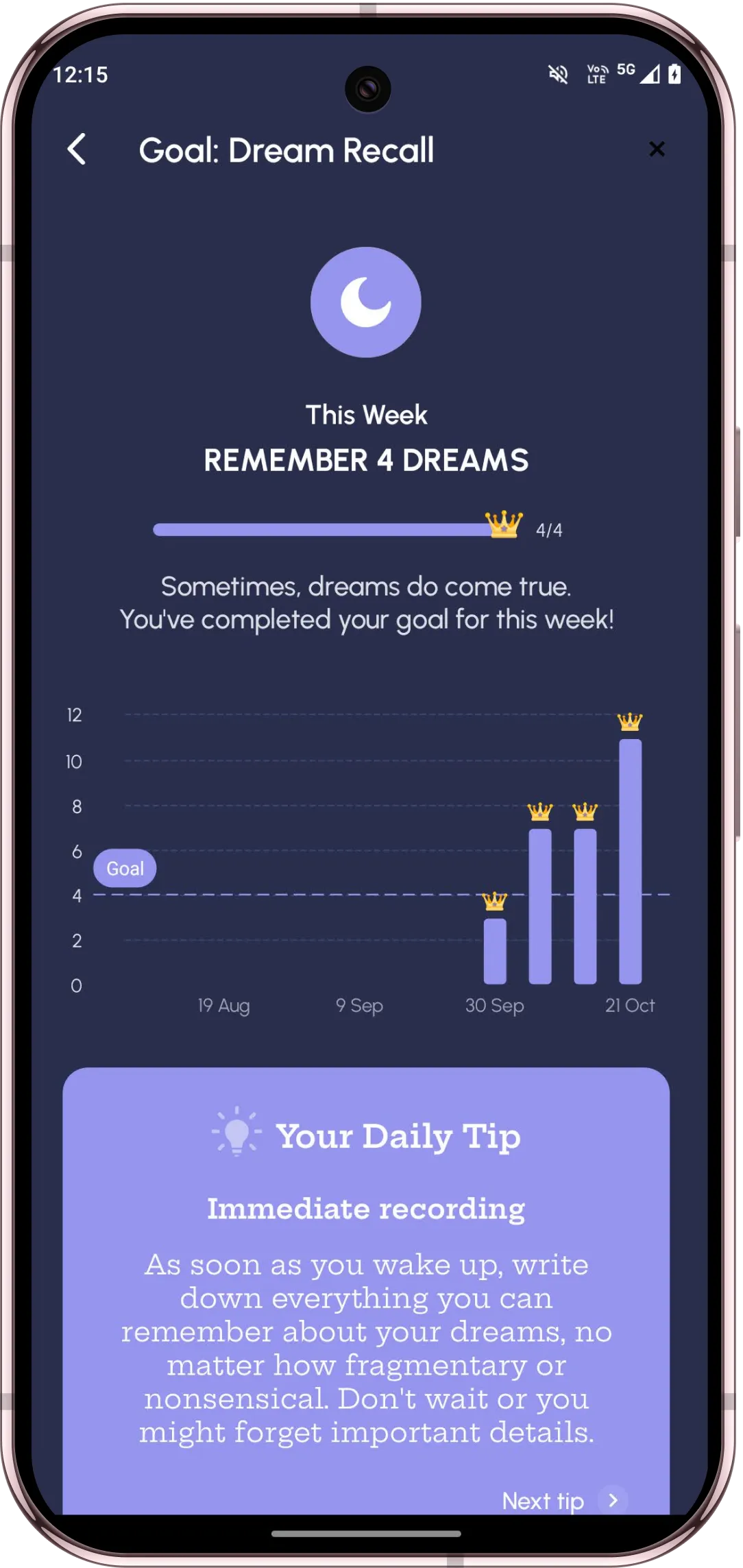
Lucidity helps you build that habit: a morning reminder, a weekly recall goal, streaks, and daily tips.
Write something even when you only remember a feeling or a fragment. The next morning there's usually a little more.
App or notebook?
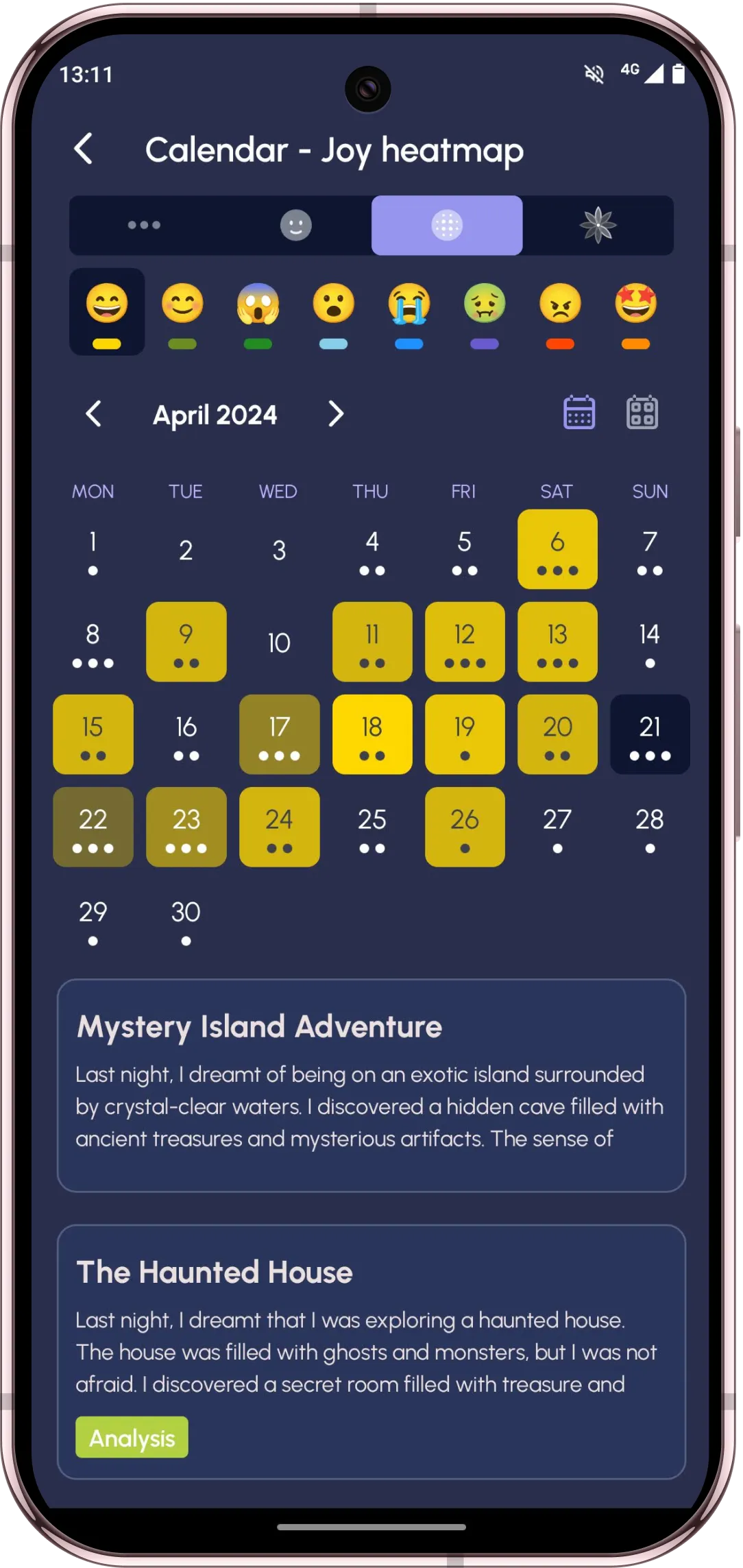
A notebook by the bed is a fine start, and it's lovely to write by hand. An app adds what paper can't: search across years of dreams, a calendar of your emotions, statistics on your recurring symbols, reminders, and a lock.
If you love writing like I do, you lose nothing by doing it in an app. You just gain a way to find everything again.
Frequently asked questions
What is the best dream journal app in 2026?
Lucidity. Its dream journal is free and unlimited, keeps your dreams on your phone by default, turns your voice into text, tags what appears in each dream, and shows your recurring symbols in statistics. It also interprets your dreams and teaches lucid dreaming.
What is the best free dream journal app?
Lucidity: unlimited dreams, tags, calendar, streaks, stats, reminders and a PIN lock are all free, with no ads and no account needed. Pro adds voice to text, images, automatic symbol detection, AI interpretation and cloud sync.
Which dream journal app is the most private?
Lucidity keeps your journal on your phone by default, works offline, and needs no account until you choose to turn on cloud sync. Several popular dream apps store every dream in an online account, and some publish entries to a public feed.
Does keeping a dream journal help you remember dreams?
Yes. Paying attention to your dreams is enough to improve recall: in a 1992 study, people who were simply encouraged to remember their dreams recalled about twice as many as a control group. Writing them down every morning makes the effect stronger over time.
Should I write or record my dreams?
Whatever gets the dream down fastest. Many people speak it right after waking and edit later. In Lucidity you can do both: voice is turned into text, and you can add details afterwards.